
scan my tesla
Børsand EngineeringAuto & Vehicles
4.168.00 Reviews
- Version
- 3.2.3
- Installs
- 10.00K
- Age Rating
- Everyone
Screenshots
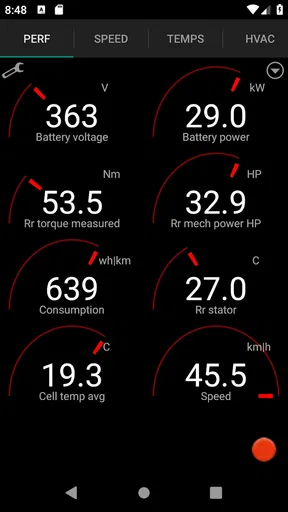
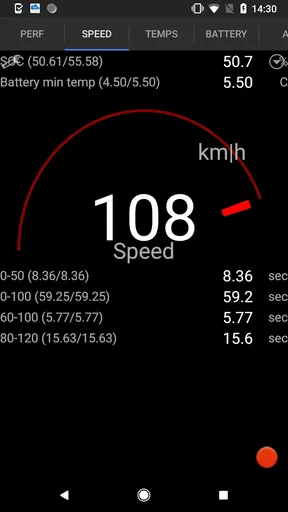
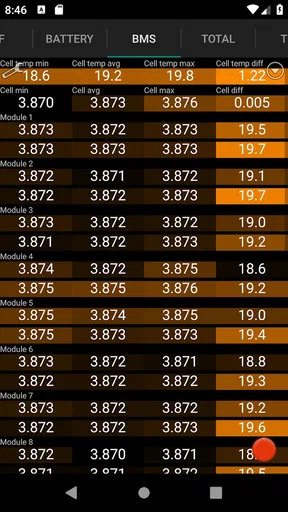
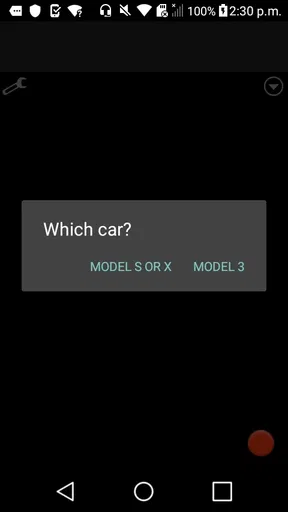
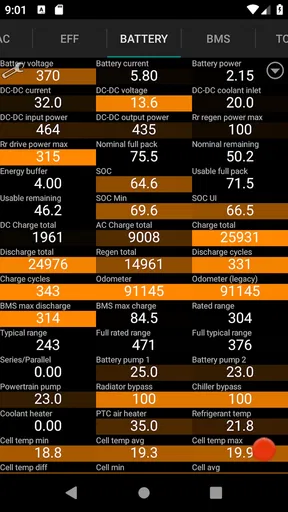
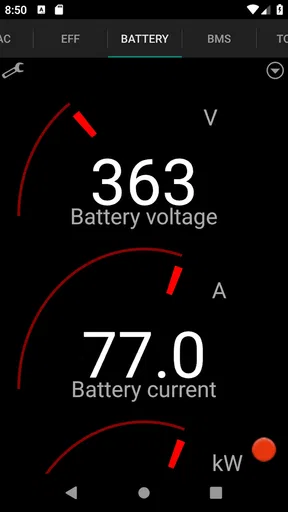
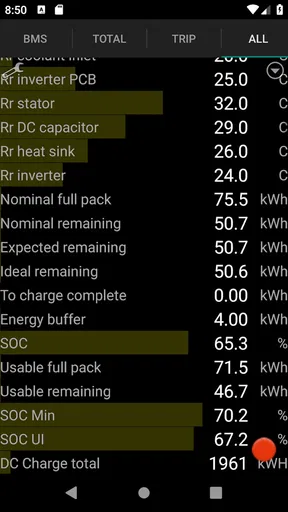
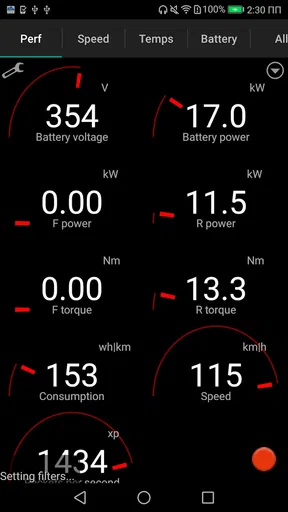
Our Review of scan my tesla
 Analysis by Appyee
When I look at an app for understanding a Tesla, I first ask a practical question: will it help me make sense of the car without turning a normal drive into a technical project? Scan My Tesla is aimed at owners who want a closer look at vehicle information than they get from the usual dashboard. It is not a plug-and-play phone app, though: you need an adapter cable and a compatible OBD2 adapter, so the setup matters as much as the software.
What to expect from the first connection
The hardware requirement is the first decision to make, not an afterthought. Before paying for the app, I would check that the cable and OBD2 adapter are the kind the app needs and that I understand how they connect to my particular car. Buying an adapter simply because it is advertised as OBD2-compatible may not be enough; compatibility with this setup is the key. If you already have the right equipment, the app is easier to justify. If not, the extra shopping and setup are part of the real cost and effort.
That also shapes speed expectations. This is not a tool I would install and expect to reveal useful information before the connection is ready. Once the required hardware is in place, it is intended for scanning and viewing vehicle data, but I would treat the first session as a setup and learning visit rather than a quick glance between errands. Give yourself time to connect everything while parked, read what the screens mean, and decide which information is actually useful to you.
In the Auto & Vehicles category, many familiar alternatives focus on simple trip summaries, charging routines, or information already presented by the car. This app is a more specialized choice: its appeal is access to diagnostic-style detail through a physical connection. That makes it more interesting to an owner who likes investigating the car than to someone who only wants a convenient daily overview. I would not choose it on the assumption that it replaces Tesla’s regular controls or service support.
When closer monitoring earns its place
The strongest use case is deliberate checking rather than constant watching. For example, if I were curious about how the car behaves on a familiar commute, I could connect while parked, review relevant readings, and compare what I see across similar drives. Keeping the route and conditions broadly alike makes observations easier to interpret than changing several things at once. The point is not to turn every journey into an experiment; it is to have a way to look more closely when I have a specific question.
Battery information can also be useful when considered over time. A single reading is easy to overinterpret, so I would avoid treating one session as proof that a battery is healthy or unhealthy. A more sensible habit is to note readings under comparable conditions and look for a pattern before drawing conclusions. That can help an owner ask better questions or feel more informed when discussing the car, but it is not a substitute for a professional assessment.
There is a trade-off in real-time monitoring, too. Watching data while driving may be engaging, but it competes with attention that belongs on the road. I would set things up before leaving, avoid fiddling with the phone in motion, and review details when safely parked. The app’s value is in giving a curious owner something to examine, not in making the driver stare at a screen.
Handling busy sessions and making the data useful
For an occasional check, the setup may feel like a reasonable bit of effort. For a heavy-use routine—frequent scanning, repeated comparisons, or keeping tabs on several areas of vehicle behavior—the cable and adapter become part of the workflow every time. I would keep the equipment together and decide in advance what I want to learn during a session. A focused check is less frustrating than opening a lot of readings without a question in mind.
A useful, non-obvious habit is to separate observation from diagnosis. If a reading catches my attention, I would record the circumstances, such as whether the car had just been driven or had been sitting, then check again under comparable conditions. That avoids treating normal variation as a fault. It also keeps the app in its best role: helping me notice information and formulate a useful follow-up, rather than encouraging a snap conclusion from one screen.
Another sensible approach is to learn a small set of readings before exploring everything else. A broad collection of vehicle information can look impressive but still be hard to use if I do not know what matters to my question. Starting with one area—such as battery behavior or a temperature reading I am trying to understand—makes the learning curve more manageable. I would expand from there only when I have a reason, rather than assuming that more numbers automatically mean better care of the car.
In a busy week, this is unlikely to be the app I open simply to see whether I have enough charge for the next trip. For that routine, the car’s own displays and familiar ownership tools are more convenient. I see this app as something to use when I have time and a specific interest: after noticing a change, before a conversation about vehicle condition, or while learning how the car behaves in different conditions. That distinction helps set a fair expectation for both convenience and value.
Reliability, interpretation, and recovery
Any reliability judgment has to account for the physical link between the phone and the vehicle. If a session does not work as expected, I would first check the adapter and cable connection and confirm that I am using the required equipment, rather than immediately assuming the app itself is at fault. A connection-dependent tool has more points where setup can go wrong than a feature that works entirely from the phone.
I would also be cautious about reading too much into a pause or an unexpected value. A useful recovery routine is simple: stop interacting while driving, park safely, check the physical connection, and start a fresh session if needed. If a reading still seems unusual, compare it later under similar conditions instead of repeatedly reconnecting in the hope that a different result will prove something. For serious concerns, a qualified Tesla service professional is the right next step.
The app should not be treated as a permanent health certificate for the car. Vehicle data can inform an owner, but interpreting it takes context, and an app cannot replace a hands-on professional diagnosis. That limitation is especially important for someone considering a used Tesla or trying to decide whether a warning is urgent. I would use the information to become better prepared for a conversation, not to make a costly repair decision on my own.
Who benefits, and who should pass
I think the best fit is a Tesla owner who enjoys understanding how the vehicle behaves and is comfortable with a little hardware setup. It may also suit someone who wants a more informed view of vehicle condition over time, provided they are patient enough to compare observations rather than chase individual readings. The developer is Børsand Engineering, and the app’s focused purpose is a better match for this kind of curious owner than for someone looking for a general-purpose driving companion.
I would skip it if I wanted a no-accessory experience, a quick charging reference, or a polished overview that requires no interpretation. It is also a poor fit if I am not prepared to learn what the readings mean. The app costs $9.99, so I would weigh that price alongside the separate adapter requirement and the likelihood that I will use the extra detail more than once. The age rating is Everyone, but the practical audience is defined less by age than by access to the right equipment and interest in vehicle data.
On Android, the current version is 3.1.4 and the minimum operating system is Android 5.0. It has a 4.2 average from around 424 ratings, with over 10,000 installs. Those figures suggest that other owners have found a reason to try it, but they do not answer the most important personal question: whether you will use a specialized scanning tool often enough to justify the hardware and learning time. I would make that decision based on the way I care for and learn about my car, not popularity alone.
Getting Started with Scan My Tesla
First things first, you have to get the app on your device. It's available for both Android and iOS, so you're covered regardless of your smartphone allegiance. Setting it up is pretty straightforward, though you will need an OBD-II adapter to connect to your Tesla’s system. Yes, a bit of hardware is required, but hey, that’s the price of going high-tech.
Once you’ve got the adapter and the app installed, connecting it is fairly intuitive. Just follow the prompts, and you’ll be up and running in no time. The app interface is clean and user-friendly, which is a big plus for those of us who aren't exactly tech wizards. No need to decode a bunch of tech jargon here.
Exploring the Features
Now, onto the juicy details—what can you actually do with Scan My Tesla? Well, for starters, it gives you a treasure trove of information about your vehicle’s performance. You can monitor battery health, motor temperatures, and even get insights into your driving efficiency. Think of it as having a mini Tesla technician in your pocket.
One of my favorite features is the real-time data monitoring. You can watch how your car’s systems are performing while you’re on the road. It’s like having a live action movie of your car’s inner workings. For those who love data (and I mean, who doesn't?), this is a goldmine.
Another cool aspect is the ability to track your battery’s degradation over time. This can be incredibly useful if you’re planning to keep your car for the long haul or even if you’re thinking about resale value. Knowing how your battery is holding up can give you peace of mind or a heads-up if something’s off.
Why It Stands Out
So, what makes Scan My Tesla stand out from the crowd? It’s the level of detail and customization you can get. You can tweak what data you want to see and how it’s displayed. It’s like having a personalized dashboard tailored to what you care about most.
And let’s not forget the community support. There’s an active user base that shares tips, tricks, and insights. If you ever hit a snag or just want to geek out over your Tesla’s stats, you’ll find plenty of like-minded folks ready to chat.
Any Drawbacks?
Of course, no app is perfect. The main drawback here is the initial setup. Not everyone’s thrilled about needing an OBD-II adapter, and it can be a bit of a hassle if you’re not tech-inclined. Plus, there's a bit of a learning curve to understand all the data, especially if you’re new to vehicle diagnostics.
Also, keep in mind that while the app provides tons of data, it doesn’t replace professional diagnostics. If you suspect something’s seriously wrong with your Tesla, it’s best to consult the experts.
Final Thoughts
All in all, Scan My Tesla is a must-have for any Tesla enthusiast who loves diving deep into data and wants to keep a close eye on their car's performance. It’s a powerful tool that offers insights that you won’t find in your regular car dashboard. Sure, it takes a bit of setup and learning, but once you’re over that hump, it’s smooth sailing.
If you’re curious to see what your Tesla is really up to, give this app a whirl. You might just find yourself enjoying the ride even more. Happy scanning!
Verdict
Strengths of scan my tesla
- Real-time data monitoring for Tesla vehicles.
- Easy-to-use interface with intuitive design.
- Comprehensive battery health insights.
- Customizable dashboard for personalized data view.
- Supports multiple Tesla models.
Limitations of scan my tesla
- Requires additional hardware for full functionality.
- Limited support for non-Tesla vehicles.
- Initial setup can be time-consuming.
- Some features require in-app purchases.
- App updates can be infrequent.
Similar Picks in This Category
View All
Android Auto
Google LLC4.1

maxim — order a taxi & food
PT. SITO4.7

Штрафы ГИБДД: проверка с фото
Pays LLC – Штрафы ГИБДД4.7

Номерограм – проверка авто
Авто Ассист4.8

Дром Авто
Дром4.9

Frequently Asked Questions
What is Scan My Tesla and how does it work?
Scan My Tesla is a diagnostic app designed for Tesla owners to monitor and analyze their vehicle's performance and data in real-time. By connecting a Bluetooth OBD-II adapter to the car, the app gathers detailed information like battery health, temperature, and more, allowing users to gain insights into their vehicle's functionality and efficiency.
Is Scan My Tesla compatible with all Tesla models?
Scan My Tesla is compatible with most Tesla models, including Model S, 3, X, and Y. However, compatibility can vary based on the model year and specific configurations. It's recommended to check the app's compatibility list or user forums for any specific model requirements before purchasing an OBD-II adapter.
Do I need any additional hardware to use Scan My Tesla?
Yes, to use Scan My Tesla, you will need a compatible Bluetooth OBD-II adapter. This device plugs into your Tesla's diagnostic port and communicates with the app to provide real-time data. Ensure you choose an adapter that is supported by the app to avoid connection issues.
How secure is my data when using Scan My Tesla?
Scan My Tesla prioritizes user privacy and data security. The app does not store data on external servers; it only reads data directly from your vehicle via the OBD-II adapter. It is important to ensure your Bluetooth connection is secure to prevent unauthorized access during data transmission.
Can using Scan My Tesla void my vehicle's warranty?
Using Scan My Tesla should not void your Tesla's warranty, as it is merely a diagnostic tool that reads data without altering any software or hardware. However, it's always a good idea to consult your vehicle's warranty terms or contact Tesla support for official guidance on using third-party diagnostic tools.
